Trivia Spin-Guess Brain Quiz
- 4.4
- Rating
- 1.00M
- Installs
- Free
- Price
 Analysis by App-foxy
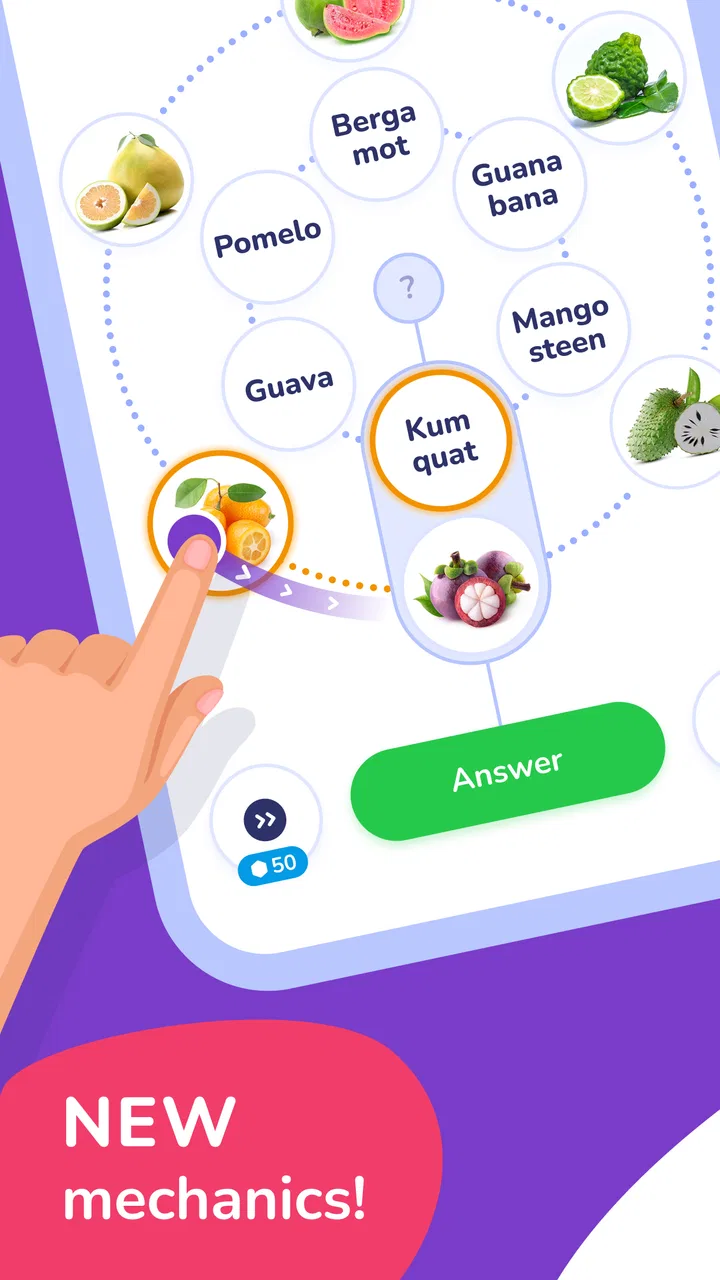
I found Trivia Spin-Guess Brain Quiz most interesting when I stopped treating it as a simple logo game and started using it as a short, flexible mental break. It is a free trivia game from Severex built around recognition and recall: you may be asked to identify a logo, song, country, or flag, with the wider presentation borrowing some of the excitement of a millionaire-style quiz. That mix makes it easy to understand within a few seconds, even if you have never played a mobile quiz game before.
My overall impression is positive, but not uncritical. The game is approachable, quick to start, and broad enough to appeal to people who enjoy general knowledge rather than one narrow subject. At the same time, its accessibility depends heavily on the player’s ability to read the screen, recognize visual material, and interact with timed or compact controls comfortably. I would recommend it for casual solo play, family guessing sessions, and short breaks, while readers who need strong customization for text, sound, motion, or input should examine the experience more carefully before committing to it.
How the quiz feels to use
I found the appeal of Trivia Spin’s quiz format lies in how quickly a clue can turn into a shared guessing game. In this section, I’ll focus on the small choices that make a session feel relaxed rather than like a test, including how I’d handle questions that don’t match my strongest subjects. That practical rhythm sets up a closer look at what playing it in everyday moments can offer.
You May Also Like

 Google Keep - Notes and lists
Google Keep’s Quiet Growth Shows the Appeal of Simpler Notes
As mobile work gets busier, Google Keep keeps winning a simple contest: capture a thought quickly, find it later, and get on with the day.

 Blood Strike: 2.5 Anniversary
Blood Strike’s Loadouts Turn Every Drop Into a Tactical Gamble
A close look at Blood Strike’s custom loadouts: how fast access to signature weapons reshapes its battle royale rhythm, rewards preparation, and narrows the gap between fights.

 Pandora - Music & Podcasts
Pandora’s Music Is Easy to Start, but Harder to Recover
Pandora’s strength is its low-effort path from a seed to a station. Its weak spot is how much confidence it asks you to place in connection, setup, and quiet recovery.

 8 Ball Pool
 Is Built on Rivalries, Rematches, and Routine
A close look at the rivalries, rematches, shared routines, and unanswered safety questions that turn a quick pool match into a persistent mobile community.

 Samsung Music
’s Quiet Strength Is Playing What You Already Own
Its reach comes less from spectacle than from dependable access to a personal library. That simplicity is both the app’s strongest retention engine and its ceiling.

 AccuWeather: Weather Radar
AccuWeather Review: A Quick, Clear Forecast for Everyday Decisions
For everyday plans, the best forecast is the one you can understand quickly. AccuWeather makes rain timing, radar, and local conditions easy to act on, with a few trade-offs.
More From Our News Desk



Readable goals and a low-friction starting point
The strongest part of the opening experience is clarity. The concept is immediately recognizable: look at a clue, think of the answer, and choose or enter what seems right. That matters for people who do not want to learn a complicated ruleset before playing. I could imagine handing the phone to a friend during a coffee break and explaining the basic idea without a long tutorial.
The subject variety also helps with orientation. A player who is not confident with brand logos may still enjoy country or flag questions, while someone who follows music more closely may feel at home with song-based prompts. This gives the game a useful social quality because different people can contribute different kinds of knowledge instead of one person dominating every round.
From a readability perspective, the important question is not only whether text is visible, but whether the whole screen can be understood quickly. Quiz games often place the clue, answer choices, progress information, and reward elements close together. I found it better to focus first on the central question and treat surrounding elements as secondary. That habit reduces visual clutter and makes the game less tiring during a longer session.
Players with attention difficulties may appreciate the straightforward loop, since each question offers a single immediate task. However, the same compact design can become demanding if small labels, dense answer choices, or decorative elements compete for attention. I would use a larger display or increase system text size where possible, then check whether the game still presents its controls comfortably. A setting that enlarges the phone’s general interface does not automatically guarantee that every in-game element will scale well.
Navigation that suits short sessions
Trivia Spin works best when I approach it as a sequence of small sessions rather than a game that requires a long uninterrupted commitment. Its trivia format makes it suitable for a few minutes while waiting for an appointment, taking a break from study, or sharing a phone with someone nearby. That short-session structure is also helpful for players who fatigue easily or prefer to stop before concentration drops.
There is a practical advantage in not needing a large amount of preparation. I do not have to build a deck, choose a category manually, or learn a complicated character system before getting value from the game. The trade-off is that a player seeking a carefully organized learning plan may find the experience less satisfying than a dedicated educational quiz app. This is entertainment-led trivia, not a replacement for structured study.
One useful personal routine is to treat mistakes as category signals. If I repeatedly miss flags but recognize songs quickly, I can use that pattern to decide whether I want a challenge or a lighter session. I would not use every wrong answer as a judgment of general knowledge; recognition-based questions are influenced by age, culture, interests, and exposure. That makes the game more enjoyable when I see it as a map of familiarity rather than a serious test.
Visual clues and different ways of paying attention
The visual side is central because logos and flags depend on shape, color, layout, and familiar symbols. This can be engaging for players who think visually, but it creates a clear barrier for anyone with limited color perception or difficulty distinguishing small details. A flag question may be easy for one person because of its color arrangement and nearly impossible for another if those colors are hard to separate.
I would recommend checking the game in the lighting where it will actually be used. A bright outdoor setting can introduce glare, while a dim room may make subtle visual differences harder to notice. A clean screen and a comfortable brightness level can make more difference than expected. If a clue looks ambiguous, moving the phone closer or changing the viewing angle may help, although that is only a practical workaround rather than an accessibility feature.
Song-related questions raise a different issue. They may favor players who can process audio quickly, remember melodies, or identify music through short exposure. Someone who is deaf or hard of hearing may not have an equivalent way to participate if an audio clue is not paired with a clear visual alternative. I would therefore avoid presenting this as an equally accessible experience for every sensory profile. The game’s category variety broadens its appeal, but it does not automatically remove the disadvantages created by audio-dependent prompts.
Motor comfort and control precision
Trivia games are usually less physically demanding than action games, and that is true here in the broad sense. The interaction is centered on reading, thinking, and selecting an answer rather than rapidly steering a character or combining several buttons. That makes it a reasonable option for someone who wants a calmer game on a touchscreen.
Even simple tapping can become uncomfortable when answer choices are close together or when a player has limited reach, tremors, reduced dexterity, or difficulty maintaining a steady grip. I found that holding the device with both hands and using the finger that gives the most accurate reach made the experience more relaxed. For one-handed use, the position of the phone matters: a larger device may provide a clearer view but require more stretching across the screen.
Players who rely on switch access, screen readers, voice control, or alternative input should test the actual interaction rather than assume that a standard quiz layout will work smoothly. I would not describe the game as unsuitable on that basis, but the core experience is still designed around direct touchscreen participation. If a player needs every control to be clearly exposed to assistive technology, a quiz platform with explicitly documented accessibility options may be a safer choice.
Using it in shared and changing environments
The game fits naturally into shared situations. Two people can look at a clue together, debate the answer, and use the phone as a conversation starter. In that setting, the player who knows the answer is not the only one getting value; explaining why a logo, flag, or country looks familiar can be just as entertaining. It also makes the game more forgiving for people who are uncomfortable with solo performance.
A realistic example would be a family waiting at a restaurant. One person holds the phone, another reads the clue aloud, and everyone suggests an answer before the tap is made. This arrangement can support someone who has difficulty reading small text or seeing a detailed image, because another participant can describe the screen. It is not a substitute for built-in accessibility, but it turns a potentially solitary game into a cooperative activity.
Noise changes the balance. In a quiet room, visual questions are easy to discuss, while a busy street or crowded waiting area may make audio-related content harder to hear and conversation harder to follow. A player who depends on sound should consider headphones if appropriate, but that may reduce the social side of shared play. Conversely, someone sensitive to noise may prefer to focus on visual categories and keep the device’s audio low.
The game is free to download, which lowers the barrier to trying it. It is marked for Everyone, making it suitable in broad age terms, although adults should still decide whether the quiz style and any purchase prompts fit the particular child using the device. Purchases are available from $0.99 to $19.99 per item, so I would switch on the usual device-level purchase protections before lending the phone to a child or using it in a family setting.
What the scale and update level suggest
The game has reached over a million installs and holds a 4.4 average from around seventeen thousand ratings, which suggests that its basic format has found a substantial casual audience. I see that as useful context rather than proof that every player will find it comfortable. Popularity can indicate that the central loop is easy to approach, but it cannot answer personal questions about text size, sensory load, or motor fit.
Severex lists the current version as 2.6.0, and the game runs on Android 8.0 or later. That compatibility range covers many devices, but anyone using an older phone should check the operating system before planning to play. The game was released on December 15, 2023, so it feels like a relatively modern mobile trivia product rather than an old title being maintained only for legacy devices.
In practical terms, I would keep the app on a device with enough free space and a reliable screen. I would also avoid making a purchase simply to solve a difficult question. The most enjoyable part is the act of remembering and reasoning, and spending money can change the tone if the player begins to see every mistake as something that should be bypassed. The free entry point is enough to decide whether the format suits you.
Where the experience still falls short
The biggest limitation is that recognition trivia is not neutral. Logo questions reward familiarity with commercial imagery, song questions reward particular listening histories, and flag questions can favor people who have studied geography. A wrong answer may reflect cultural exposure rather than poor reasoning. I would be careful about using the score as a measure of intelligence, especially with children or players who are learning English.
Language can also affect access. Even when the image is clear, a country name, clue, or answer choice may be harder for someone who is still building vocabulary. A bilingual household might enjoy solving together, but a solo player could be placed at a disadvantage if the wording is less familiar than the subject itself. This is another reason I prefer the game as a relaxed challenge rather than a formal assessment.
There is a related issue for players who need predictable pacing. A quiz can feel comfortable when the player controls the rhythm, but less comfortable if questions, transitions, or answer decisions move faster than expected. Anyone who needs extra processing time should try a calm session first rather than assuming that every prompt will allow unlimited reflection. If the game’s pace becomes stressful, a traditional crossword, untimed puzzle, or text-based trivia format may be a better alternative.
Players who want deep explanations may also outgrow it. Guessing a flag or logo is satisfying, but the learning value depends on what happens after the answer. A person who wants historical context, pronunciation guidance, detailed music information, or a structured geography course will probably get more from a specialist app. Trivia Spin is strongest as a recognition-and-recall game, not as a complete reference tool.
My inclusive verdict
I recommend Trivia Spin-Guess Brain Quiz to people who want accessible-to-start entertainment, varied general-knowledge prompts, and a game that can work alone or with friends. Its free price makes experimentation easy, its Everyone age label gives it a broad audience, and its combination of logos, songs, countries, and flags prevents the subject matter from feeling too narrow. The game is especially well suited to short breaks and informal group play.
My recommendation comes with a clear qualification: it is easiest for players who can comfortably read compact touchscreen content, distinguish visual clues, hear any sound-based material, and tap answer controls accurately. The experience can be made more inclusive through shared play, careful lighting, a suitable device position, and choosing the categories that feel comfortable, but those workarounds are not the same as comprehensive accessibility controls.
If you want a light quiz that rewards memory and recognition, I think it is worth trying. If you need adjustable text, dependable alternatives to audio, extensive assistive-technology support, or a structured learning path, I would compare it with a dedicated accessible quiz or educational app first. For everyone else, the best way to judge it is to play a few short rounds, notice which question types feel enjoyable rather than frustrating, and decide whether its quick guessing rhythm matches the way you like to use your phone.
FAQs for Trivia Spin-Guess Brain Quiz
01What is Trivia Spin-Guess Brain Quiz and how does it work?
Trivia Spin-Guess Brain Quiz is an engaging mobile game that challenges players with a variety of trivia questions across multiple categories. Players spin a virtual wheel to select categories and answer questions to earn points. The app is designed to test your knowledge and improve your trivia skills while offering a fun, competitive experience.
02Is Trivia Spin-Guess Brain Quiz free to download and play?
Yes, Trivia Spin-Guess Brain Quiz is free to download and play on both Android and iOS platforms. While the core game is free, it may contain optional in-app purchases, such as extra lives or hints, which can enhance the gaming experience but are not necessary to enjoy the game fully.
03What are the main features of Trivia Spin-Guess Brain Quiz?
Trivia Spin-Guess Brain Quiz offers a variety of features including a vast database of questions across different categories, multiplayer mode to compete with friends, daily challenges, and leaderboards to track your progress. The game also includes a user-friendly interface and regular updates with new content to keep the experience fresh.
04Can I play Trivia Spin-Guess Brain Quiz offline?
Trivia Spin-Guess Brain Quiz requires an internet connection to access its full range of features, including updates, multiplayer matches, and leaderboard tracking. However, some basic gameplay may be available offline, but for the best experience and to enjoy all features, a stable internet connection is recommended.
05Are there any age restrictions for playing Trivia Spin-Guess Brain Quiz?
Trivia Spin-Guess Brain Quiz is designed for players of all ages, offering family-friendly content that is suitable for children and adults alike. However, parental guidance is suggested for younger players, especially when considering in-app purchases or online interactions in multiplayer mode.
Pros
- Engaging and diverse questions.
- User-friendly interface.
- Frequent updates with new quizzes.
- Multiplayer mode for friends.
- Offline play available.
Cons
- Occasional ad interruptions.
- Limited free hints.
- Requires stable internet for updates.
- Some questions repeat.
- In-app purchases can be pricey.

Trivia Spin-Guess Brain Quiz
Gallery